



Construction daily report: what to log every day (free template)
In this article
Every contractor has had the call. The homeowner wants to know why nobody was on site Tuesday, or a sub says the area wasn't ready when they showed up, or a change you agreed on the driveway three weeks ago is now a dispute about money. The answer is usually somewhere: in a text thread, a photo roll, a foreman's memory. A construction daily report puts it in one dated place, every day of the job.
This guide covers what a daily report should include, a free template you can copy today, the mistakes that make daily logs useless when you need them, and how Bolster lets your crew log the day from their phone while the schedule, tasks and budget stay connected to it.
Watch: Dan takes a kitchen remodel from the signed estimate to a full schedule, assigns the tasks to the crew and subs, and logs the day on site.
What Is a Construction Daily Report?
A construction daily report (also called a daily log or a daily construction report) is a short, dated record of what happened on a job site that day: who was there, what got done, what got in the way and what it looked like. It is written by whoever runs the site, usually the owner, the lead carpenter or the foreman, and it is filed against the job.
On a commercial project the daily report is often a contract requirement. On a residential job nobody makes you write one, which is exactly why most small contractors don't, until the day they need it.
Why Daily Logs Matter on Residential Jobs
A daily log earns its keep in four places:
- Disputes. When a homeowner questions a bill or a timeline, a dated note and photo from the day in question ends the argument quickly and politely.
- Change orders. Most scope changes start as a conversation on site. If the log records the conversation, the change order that follows is a formality, not a negotiation.
- Delays. Inspections that slip, materials that arrive late and weather days all push the finish date. A log shows what caused the delay, so the homeowner hears it as a fact, not an excuse.
- Job costing. Knowing who was on site and for how long is the first step to knowing whether the labor on the job matches what you priced. Our guide to time tracking apps for contractors goes deeper on the hours side.
There is a quieter benefit too. When the log lives with the job, you can run three sites without driving to all three every day.
What to Include in a Daily Construction Report
Keep it short enough that it actually gets filled in. These are the fields that matter:
- Date and job. The job name or address, and the date. Every entry is filed against one job.
- Who was on site. Your crew by name, plus any subcontractors and how many people they brought.
- Work completed. Which tasks moved forward today, and which were finished. Tie it to the schedule if you have one.
- Delays and issues. Anything that stopped or slowed work: a failed inspection, a missing delivery, a sub who didn't show, hidden damage behind a wall.
- Deliveries. What arrived, and anything that arrived damaged or short.
- Visitors and inspections. Inspectors, the homeowner, the designer, and what was agreed.
- Weather. Only if it affected the work, which on exterior jobs it often does.
- Photos. Progress photos of the day's work, and close-ups of anything you may need to explain later.
- Notes for tomorrow. What the next crew in needs to know.
Free Construction Daily Report Template
Copy this into a spreadsheet, a notes app or a printed sheet. One row per job per day works for most small contractors.
| Field | Example |
|---|---|
| Date | Tue 17 Nov 2026 |
| Job | Baker kitchen remodel, 41 Elm St |
| Filled in by | Alex P. (lead carpenter) |
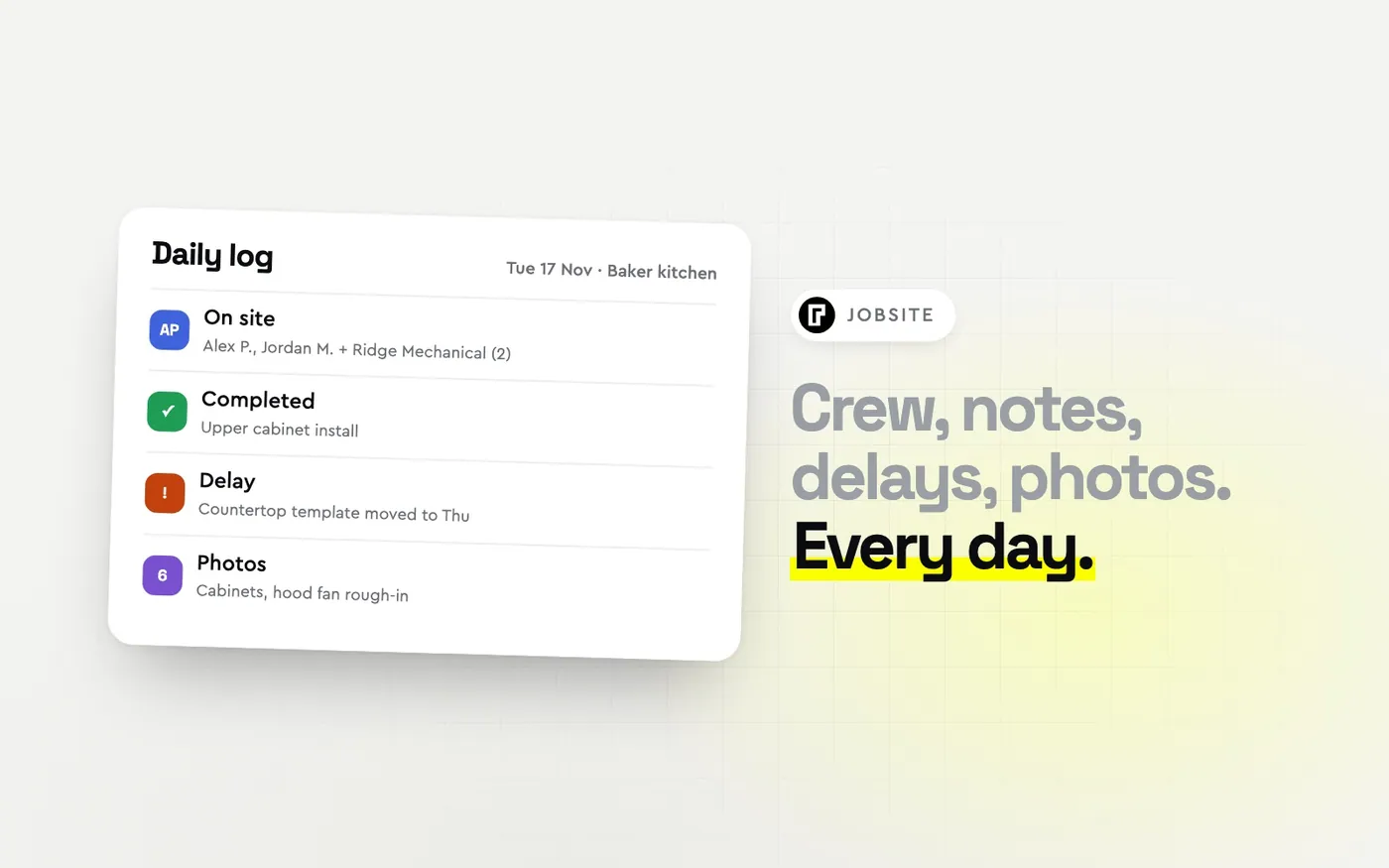
| On site | Alex P., Jordan M. (crew); Ridge Mechanical (2 people) |
| Work completed | Upper cabinets hung. Hood fan installation started. |
| Tasks finished | Upper cabinet install |
| Delays and issues | Countertop template moved from Wed to Thu (fabricator) |
| Deliveries | Hood fan and ducting arrived, no damage |
| Visitors and inspections | Homeowner walk-through at 4:00, approved cabinet layout |
| Weather | n/a (interior) |
| Photos | 6 (cabinets, hood fan rough-in, damaged drywall corner) |
| Notes for tomorrow | Finish hood fan venting before the electrician arrives Thursday |
Two tips for using it. Fill it in before you leave the site, not at night from memory. And write the delay down the day it happens, with the reason, even if it feels minor; three minor delays are a week.
If you also need a schedule to log against, our construction scheduling guide includes a free stage-by-stage schedule template for remodels and additions.
Common Daily Log Mistakes
Logging at the end of the week. A Friday catch-up is a reconstruction, not a record. The details that matter in a dispute (the time, the exact words, the photo) are gone by then.
Writing "worked on kitchen". A log entry nobody can act on is noise. Name the task and say whether it is finished.
Keeping photos somewhere else. Photos on one person's phone, notes in a notebook and delays in a text thread can't be pulled together quickly when a homeowner asks what happened on Tuesday.
Not logging delays you didn't cause. The late fabricator and the rescheduled inspection belong in the log most of all, because those are the days the homeowner will ask about.
Making the crew retype what you already know. If the foreman has to write out the job, the address and the task list every day, the log gets skipped. The less they type, the more they log.
How Bolster Handles Daily Logs, Tasks and the Schedule
In Bolster the daily log isn't a separate form. It sits on the job, next to the schedule and the tasks that came from your estimate.
The schedule is already built. When you book a job, every line on the estimate becomes a task on the schedule, grouped into stages. In the walkthrough, a kitchen remodel comes out as 19 tasks over 16 days, from floor protection to final clean, with nothing typed in. See scheduling for how it works.
Tasks go to the people doing them. Assign any task to someone on your team or to a subcontractor, right from the schedule, and notify them by email or SMS. They get a link to their task list, with no login to remember, and mark each task Not started, In progress or Completed. Overdue tasks turn red, so you see the slip before the homeowner does.
The day gets logged from the phone. Your crew records who was on site, notes, delays and photos for every day of the job, from their phone. When a client asks what happened on Tuesday, the answer is dated and in one place. See daily logs for how it works.
The homeowner sees the schedule. Turn on Share with customer and the schedule shows up in your customer's portal, so "when are you starting" answers itself.
The money follows the work. When a task is completed you approve it for quality, and the payment request goes to the customer automatically. Hours land on the job budget, so you can see the labor against what you priced. One contractor on our scheduling page put the saving at about two hours a week per project.
Scheduling, tasks and daily logs are part of Bolster Pro and up. Book a demo and we'll build a schedule from one of your own estimates.
Daily Report Checklist
Before you leave the site, check that today's entry has:
- The date, the job and who filled it in
- Everyone on site, crew and subs
- The tasks worked on, and which ones are finished
- Every delay, with the reason
- Deliveries, and anything damaged or short
- Any inspection or homeowner visit, and what was agreed
- Photos of the day's work and anything you may need to explain
- A note for whoever is in tomorrow
Frequently Asked Questions
What should a construction daily report include?
The date and job, who was on site (crew and subs), the work completed, any delays and their causes, deliveries, inspections and visitors, weather if it affected the work, photos, and notes for the next day.
What is the difference between a daily log and a daily report?
On most residential jobs they mean the same thing: a dated record of the day on site. Some larger firms use "daily log" for the raw notes and "daily report" for the summary sent to the owner or client.
Who fills out the daily construction report?
Whoever runs the site that day, usually the owner, the lead carpenter or the foreman. It works best when the person on site can fill it in from their phone before they leave.
How long should you keep daily construction reports?
Keep them at least as long as your warranty period and any limit for claims on the job, which is often several years. Check what applies in your state or province. Stored with the job, they cost nothing to keep.
Is there an app for construction daily logs?
Yes. Several construction apps include daily logs. In Bolster the daily log sits on the job alongside the schedule and tasks built from your estimate, so the crew logs who was on site, notes, delays and photos from their phone. Book a demo to see it on your own job.